
Friday, July 17, 2026 | 13 minutes
Multi-Tenant .NET: Shared Database With Partitions
Part of the series: Multi-Tenant .NET
- Multi-Tenant .NET: Shared Database With Partitions (you are here)Part 1 of 3. Building a shared-database multi-tenant app in .NET with EF Core global query filters, then using SQL Server table partitioning so the database physically keeps each tenant's data in its own drawer.
- Multi-Tenant .NET: Shared Database With Schema SeparationPart 2 of 3. Moving each tenant into its own SQL Server schema — which lets us delete the query filter, the TenantId column, and the SaveChanges stamp from Part 1, in exchange for exactly one new thing: a schema-aware model cache key.
- Multi-Tenant .NET, Part 3: Separate Buildings (Database per Tenant)Part 3 of 3. Giving every tenant its own database - the strongest isolation there is. It deletes even more code than Part 2 (including the model cache key), and replaces it with a connection-string swap, a catalog database, and the joy of migrating N databases on every deploy.
- Multi-Tenant .NET, Part 4: Moving DayPart 4 of 3. Surprise! It's a bonus post for the series. What happens when you need to move to a new approach?
Picture the guild hall on a busy night. A dozen adventuring parties are crammed into the place, elbows on the same long tables, all shouting their orders for mead and ale to the same overworked barkeep. One ledger sites behind the bar, and every party’s roster, gold, and quest logs get scratched into it. It works - right up until it doesn’t. The barkeep flips desperately through page after page of records, trying to find yours. Eventually, they get there, but it takes forever as they flip past everyone else’s records until they can find yours.
That’s multi-tenancy in a nutshell. One application (the guild hall), many tenants (the parties), and a single shared database (the ledger) that somehow has to keep everyone’s stuff separate and let the barkeep find any given party’s pages without reading the whole book.
I’ll be working through a 3-part series, looking at different ways that you can accomplish this task using Entity Framework Core in .NET and SQL Server as your data store. Let’s walk through it.
Multi-Tenancy, 3 ways
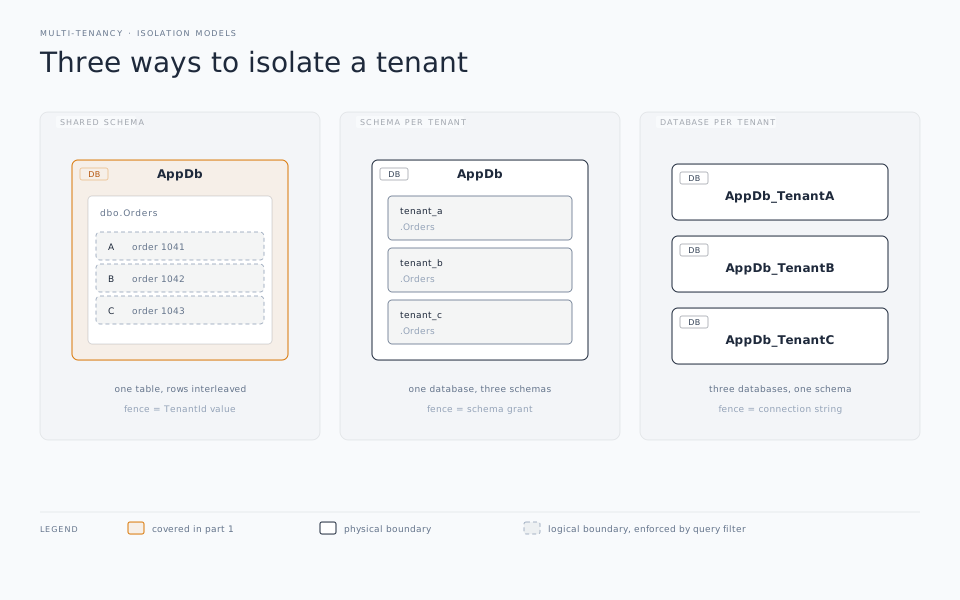
Before we get into the code, let’s look at the 3 primary methods of working with multi-tenancy.
- Shared database, shared schema Everyone has the same schema, in the same database, with an ID column in the core tables that identifies what tenant that record belongs to. It’s the cheapest to set up and run, the easiest to migrate, and it tends to be the one most SaaS applications tend to land on. This post will look at that approach.
- Schema per tenant Every party gets a separate schema inside the same physical database. It’s a middle ground, but it can get really awkward as the number of tenants grows. Part 2 of the series will look at this approach.
- Database per tenant Every party gets its own private ledger. This has the strongest isolation, but now you’re managing as many databases as you have tenants, including all the chores around migrations, backups, and so forth. Part 3 of this series will look at that in more detail.
One of the benefits of SQL Server is that we can claw back some of that “everyone’s jumbled together” downside of the first approach using its partitioning functionality.
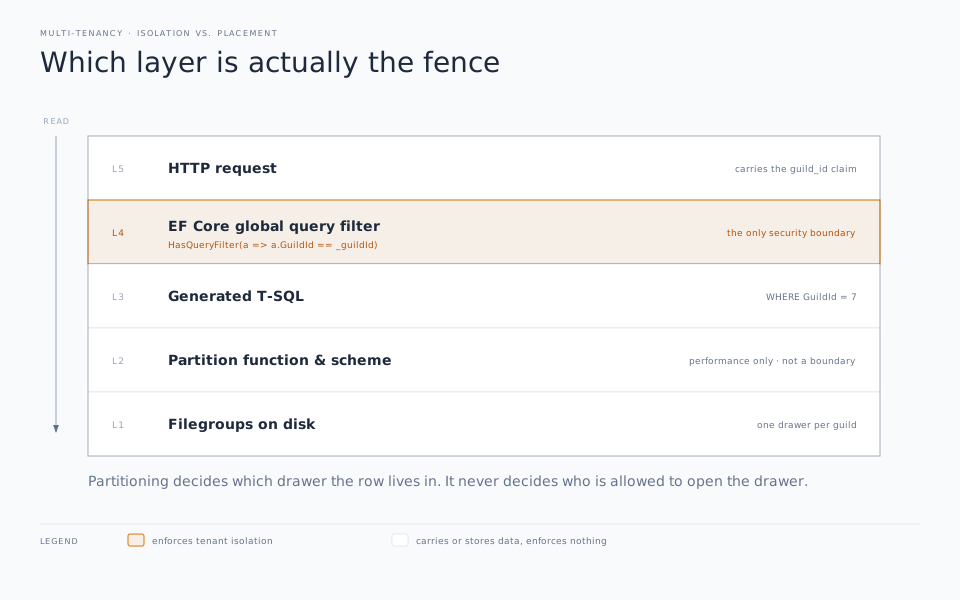
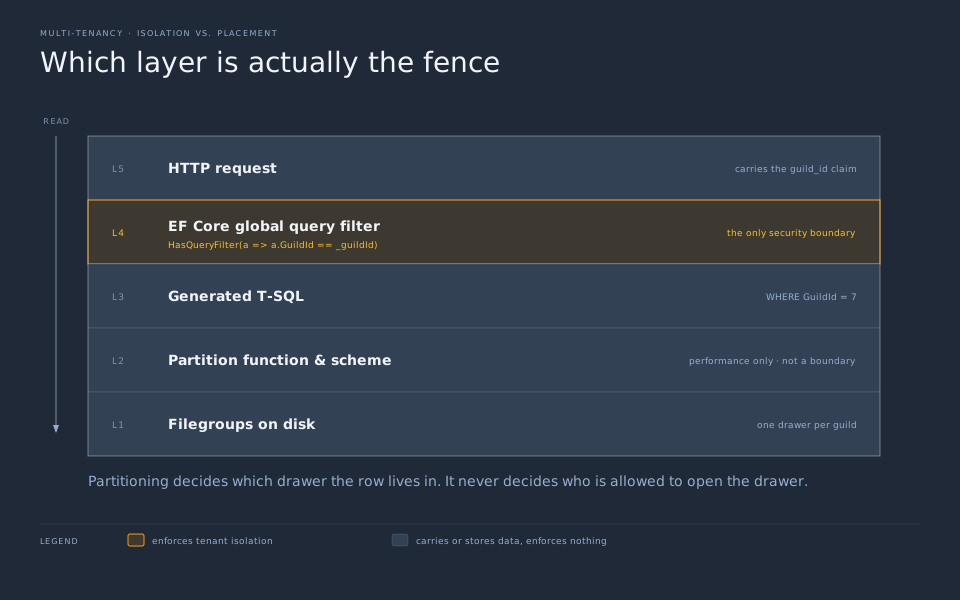
Another thing we need to clear up right here at the beginning. SQL Server partitioning is not a security boundary. It doesn’t isolate tenants from each other. It’s a physical storage trick to improve performance. It creates a dresser with a bunch of different drawers and it decides what drawer a record lives in based on the setup. That’s it.
The actual isolation, and the part that keeps Party A from reading Party B’s data, comes entirely from the .NET Entity Framework functionality available utilizing query filters. Partitioning just makes it all go faster and keeps it easier to maintain. Keep those two items separate in your mind and you’ll be just fine.
Resolving the Tenant
Everything hinges on the app knowing which party is currently at the bar. In a web app that typically comes from a subdomain, a header, or a claim on the authenticated user identifying what tenant they belong to. We’ll wrap that up in a provider so the rest of the code doesn’t care where it came from:
public interface ITenantProvider
{
    int GuildId { get; }
}

public sealed class HttpTenantProvider : ITenantProvider
{
    public int GuildId { get; }

    public HttpTenantProvider(IHttpContextAccessor accessor)
    {
        // Swap this for whatever your app actually uses:
        // subdomain, custom header, JWT claim, etc.
        var claim = accessor.HttpContext?.User.FindFirst("guild_id")?.Value;

        GuildId = int.TryParse(claim, out var id)
            ? id
            : throw new InvalidOperationException("No guild in scope for this request.");
    }
}
We’ll register it as scoped, so it’s resolved fresh per request. This is critical so tenant requests don’t bleed over into each other:
builder.Services.AddHttpContextAccessor();
builder.Services.AddScoped<ITenantProvider, HttpTenantProvider>();
builder.Services.AddDbContext<GuildDbContext>(options =>
    options.UseSqlServer(builder.Configuration.GetConnectionString("Guild")));
We’ll keep the DbContext scoped as well so each request gets a context that already knows which guild it’s serving. No ambient statics, and no passing the tenant through every method call.
Hail, Adventurer
Here’s our tenant-owned entity. We’ll mark it with an interface so we can find “things that belong to a guild” more generically later:
public interface IBelongToGuild
{
    int GuildId { get; }
}

public class Adventurer : IBelongToGuild
{
    public int Id { get; set; }
    public int GuildId { get; set; }
    public string Name { get; set; } = string.Empty;
    public string Class { get; set; } = string.Empty;
    public int Level { get; set; }
}
Now lets’s look at our DbContext which holds our query filter, and one important gotcha:
public class GuildDbContext : DbContext
{
    private readonly int _guildId;

    public const string GuildFilter = nameof(GuildFilter);

    public GuildDbContext(DbContextOptions<GuildDbContext> options, ITenantProvider tenant)
        : base(options)
        => _guildId = tenant.GuildId;

    public DbSet<Adventurer> Adventurers => Set<Adventurer>();

    protected override void OnModelCreating(ModelBuilder modelBuilder)
    {
        modelBuilder.Entity<Adventurer>(b =>
        {
            // The partitioning column HAS to be part of the key.
            // More on why in a minute — for now, just trust me.
            b.HasKey(a => new { a.Id, a.GuildId });
            b.Property(a => a.Id).ValueGeneratedOnAdd();

            b.HasQueryFilter(GuildFilter, a => a.GuildId == _guildId);
        });
    }
}
The HasQueryFilter line is the isolation part of the story. As defined, every query EF Core builds against the Adventurers table automatically gets a WHERE GuildId = @guild added on to it. You never have to write that or implement it yourself. That means you will never forget to add it to your query. A forgotten tenant filter is exactly the bug that can make for a very bad day for you as a developer. With query filters, you save yourself from having to face that war room call.
For those of you still working with older versions of EF Core, take note of the name that we give to the filter: GuildFilter. This is the EF Core 10 way of doing it. Before EF 10 you got exactly one filter per entity. So if you wanted to add both a tenant filter and a soft-delete filter, you had to combine them into an all-or-nothing approach. With EF Core 10, you can now stack multiple named filters on the same entity. This lets you ignore individual filters when you need to using an IgnoreQueryFilters() function while still honoring any other query filters. For example, IgnoreQueryFilters(["SoftDeleteFilter"]) lets you ignore your soft-delete filter while still honoring the tenant isolation filter. If you’re doing multi-tenant apps, this alone is worth the upgrade to .NET 10.
One other critical thing: EF parameterizes that _guildId field rather than baking the value into the compiled query. This protects you from any kind of injection attack and lets SQL Server reuse the query plan across every guild, improving performance.
Stamping the guild on the way in the door
The query filter handles the read part, but what about writes? You can’t trust an adventurer to be honest about what party they belong to. We need a mirror for that: when an adventurer is created, the bouncer at the door needs to stamp the GuildId on them before they can be admitted. For that functionality, I’ve added that into my SaveChanges function:
public override int SaveChanges()
{
    StampGuild();
    return base.SaveChanges();
}

public override Task<int> SaveChangesAsync(CancellationToken ct = default)
{
    StampGuild();
    return base.SaveChangesAsync(ct);
}

private void StampGuild()
{
    foreach (var entry in ChangeTracker.Entries<IBelongToGuild>())
    {
        if (entry.State == EntityState.Added)
        {
            entry.Property(nameof(IBelongToGuild.GuildId)).CurrentValue = _guildId;
        }
    }
}
This protects us from someone trying to inject themselves into someone else’s party where they weren’t invited. “You look trustworthy” doesn’t cut it when it comes time to pay the bar tab. Here, new rows get the current guild. No exceptions. No forgetting.
For a real production app, I’d probably want to move this into some kind of a SaveChangesInterceptor to keep the context tidy, but you get the idea.
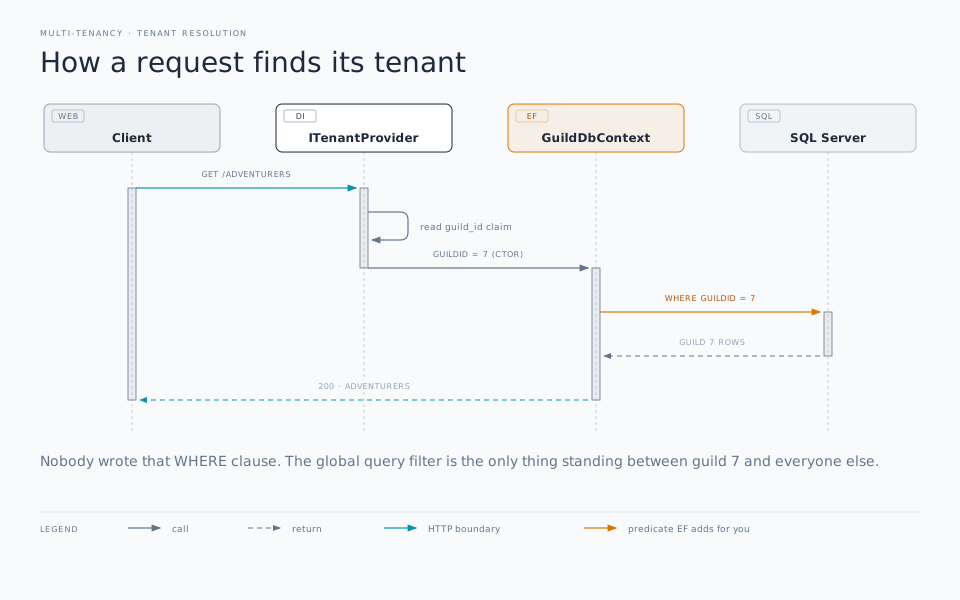
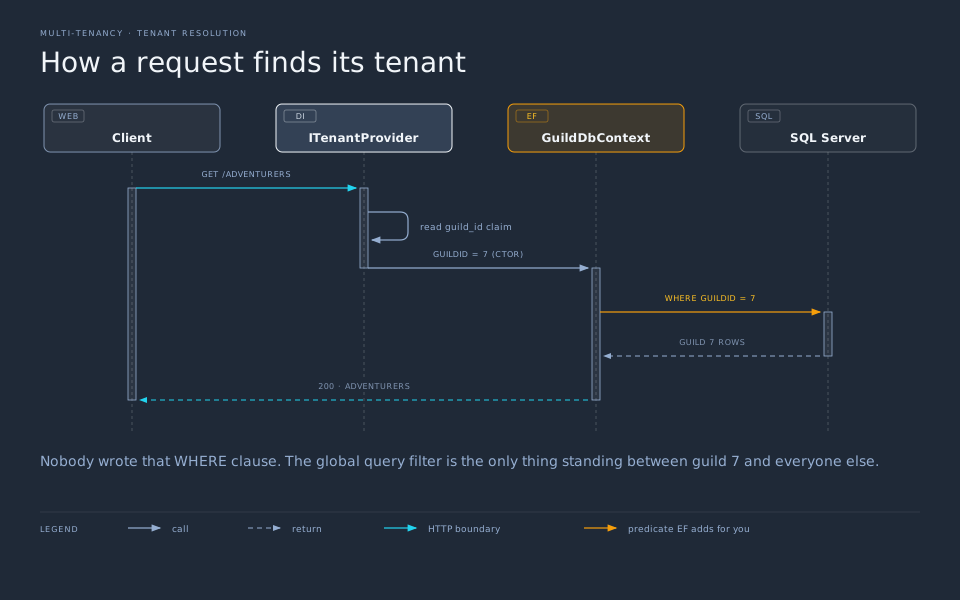
WHERE clause.SQL Server partitioning: Every party gets its own drawer
So far this is textbook shared-schema multi-tenancy. Here’s where I get a bit greedy and take advantage of SQL Server’s features.
Right now all our adventurers - every party - lives intermixed in one big heap of rows. As the guild hall grows and more parties are granted admission, it gets harder and harder for the barkeep to find anyone’s tab. They have to keep paging through the whole ledger, even if they’re only interested in Party A’s records. Partitioning changes the physical layout of the ledger, turning it into a multi-volume set, each in its own physical book, reducing the number of records to push through and ignoring the rest.
There are three pieces to make it work:
- A partition function that says how to slice rows into partitions based on a column’s value.
- A partition scheme that maps those partitions onto filegroups (physical storage).
- A table whose clustered index is built on that scheme.
-- 1. One boundary per guild. RANGE RIGHT means the boundary
--    value belongs to the partition on its right.
CREATE PARTITION FUNCTION pfGuild (int)
AS RANGE RIGHT FOR VALUES (1, 2, 3);

-- 2. Send every partition to PRIMARY for now. In a bigger setup
--    you'd spread these across filegroups on different disks.
CREATE PARTITION SCHEME psGuild
AS PARTITION pfGuild ALL TO ([PRIMARY]);
With RANGE RIGHT FOR VALUES (1, 2, 3) you get four partitions: everything below 1, then 1, then 2, then 3 and up. Guild 1 lands in its own drawer, guild 2 in the next, and guild 3 shares the tail with anyone higher — which is a nice segue into “how do I add a new tenant,” coming up shortly.
Now the gotcha
You cannot partition a table on a column that isn’t in its unique key. If you try to build a clustered primary key on Id alone while partitioning on GuildId, SQL Server will critical hit you with:
Partition columns for a unique index must be a subset of the index key.
And you will fail your saving throw. The reason is actually sensible: to enforce uniqueness, the engine wants to check a single partition, so the partitioning column has to be part of the key that guarantees uniqueness. That’s why our EF key was new { a.Id, a.GuildId } and not just a.Id. The Id is still globally unique because it’s an IDENTITY — the composite key just means the constraint is on the pair. This one rule quietly drives half the design decisions in a partitioned multi-tenant schema, so it’s worth implanting in your brain somewhere.
Wiring partitioning into EF Core migrations
EF Core doesn’t know or understand partitioning functions and their related schemes exist. It won’t scaffold them. It won’t put your table on a partitioned scheme for you. You have to do it yourself. Why? Because EF Core is intended to be mostly data system agnostic and partitioning is largely just a SQL Server feature.
So you have to do it yourself. First, you let EF Core create the normal table migration itself as it always does. Then, you add a second migration of raw SQL. That keeps EF Core’s model snapshot valid while you can take advantage of SQL Server underneath the covers.
The first migration is whatever dotnet ef migrations add InitialCreate gives you — a plain Adventurers table with the composite clustered PK. The second one does the interesting work:
public partial class PartitionAdventurersByGuild : Migration
{
    protected override void Up(MigrationBuilder migrationBuilder)
    {
        migrationBuilder.Sql("""
            CREATE PARTITION FUNCTION pfGuild (int)
            AS RANGE RIGHT FOR VALUES (1, 2, 3);
            """);

        migrationBuilder.Sql("""
            CREATE PARTITION SCHEME psGuild
            AS PARTITION pfGuild ALL TO ([PRIMARY]);
            """);

        // Rebuild the clustered PK onto the partition scheme.
        // Dropping and re-adding the clustered index physically
        // relocates the rows into their partitions.
        migrationBuilder.Sql("ALTER TABLE Adventurers DROP CONSTRAINT PK_Adventurers;");
        migrationBuilder.Sql("""
            ALTER TABLE Adventurers
            ADD CONSTRAINT PK_Adventurers PRIMARY KEY CLUSTERED (Id, GuildId)
            ON psGuild(GuildId);
            """);
    }

    protected override void Down(MigrationBuilder migrationBuilder)
    {
        migrationBuilder.Sql("ALTER TABLE Adventurers DROP CONSTRAINT PK_Adventurers;");
        migrationBuilder.Sql("""
            ALTER TABLE Adventurers
            ADD CONSTRAINT PK_Adventurers PRIMARY KEY CLUSTERED (Id, GuildId);
            """);
        migrationBuilder.Sql("DROP PARTITION SCHEME psGuild;");
        migrationBuilder.Sql("DROP PARTITION FUNCTION pfGuild;");
    }
}
The clustered index is the table’s data. Rebuilding it on psGuild(GuildId) is what shuffles the rows for each party into its own partition. EF Core keeps thinking it owns a perfectly ordinary table, and it does. It just happens to have sorted that table into separate drawers now.
You scratch my back, I’ll scratch yours
Here’s the best part. Remember that every query gets a WHERE GuildId = @guild, thanks to the query filter. And GuildId is our partitioning column. So when SQL Server sees that predicate in the WHERE clause, it does partition elimination. This is the part that figures out which drawer will have the matching row and ignores the rest of the table entirely as if it doesn’t exist.
So, the exact same query filter that keeps Party A from seeing Party B’s data on the front end also tells the engine to only touch Party A’s drawer. The isolation mechanism and the partition mechanism all derive from the same WHERE clause. You write zero extra code and you get the benefits of both features.
And that’s the whole point, really. Pick a partitioning column that already lines up with the filter you’re already applying everywhere else, and the two features reinforce each other.
That mimic is gonna come back to bite you later
What happens when the guild onboards a new party? Well, do nothing and Party D, Party E, and anyone else gets lumped into the same partition as party C. This is because we only defined 3 partition boundaries. When you add a new party, you need to split the range:
ALTER PARTITION SCHEME psGuild NEXT USED [PRIMARY];
ALTER PARTITION FUNCTION pfGuild() SPLIT RANGE (4);
And you can certainly automate this as part of the onboarding process for a new tenant. There are some critical pieces to keep in mind.
Don’t go one-partition-per-tenant forever. It’s tidy at small scale, and it unlocks per-party maintenance tricks — you can TRUNCATE, compress, or SWITCH out a single party’s partition without touching anyone else’s data. This can make offboarding a tenant delightfully clean. But SQL Server tops out at 15,000 partitions, and thousands of tiny partitions get unwieldy long before that. Past a certain tenant count you’ll want to bucket guilds into ranges (hash them into N partitions) rather than one drawer each.
It’s in every edition now. Partitioning used to be an Enterprise-only luxury, so a lot of older advice assumes you can’t have it. Since SQL Server 2016 SP1 it’s available in every edition — Standard, Web, even Express — plus Azure SQL. No excuse not to reach for it.
Say it with me one more time: partitioning is not isolation. Anyone who calls IgnoreQueryFilters() or drops to raw SQL can read straight across partitions. Your tenant boundary is the query filter (and, ideally, defense in depth around it). Partitioning is the filing system, not the lock on the door. If you need true isolation — regulatory separation, “these two tenants must never share storage” — that’s a database-per-tenant conversation, not a partitioning one.
Rolling it all up
So the finished setup is four moving parts, and each has exactly one job:
ITenantProviderfigures out which guild is at the bar this request.- The named query filter hides every other guild’s rows on read, automatically.
- The
SaveChangesstamp brands every new row with the right guild on write. - SQL Server partitioning keeps each guild’s rows in their own drawer, and the tenant filter you already had turns that into free partition elimination.
The guild hall is still one building with one ledger. But now the barkeep flips straight to your party’s page, nobody sees anybody else’s roster, and the whole thing scales without turning that ledger into an unreadable mess.
Next up: private rooms
This approach is cheap and easy to run, but the isolation is logical — one forgotten IgnoreQueryFilters() and Party A is reading Party B’s mail. In Part 2, we’ll give each guild its own schema so the isolation lives in the database structure itself, not in a WHERE clause. The fun part: once the schema does the isolating, a big chunk of the machinery we just built — the query filter, the SaveChanges stamp, even the TenantId column — gets to go away.
Now if you’ll excuse me, I’ve got to grab another cask of dwarven ale from the basement.