
Thursday, July 30, 2026 | 7 minutes
Multi-Tenant .NET: Shared Database With Schema Separation
Part of the series: Multi-Tenant .NET
- Multi-Tenant .NET: Shared Database With PartitionsPart 1 of 3. Building a shared-database multi-tenant app in .NET with EF Core global query filters, then using SQL Server table partitioning so the database physically keeps each tenant's data in its own drawer.
- Multi-Tenant .NET: Shared Database With Schema Separation (you are here)Part 2 of 3. Moving each tenant into its own SQL Server schema — which lets us delete the query filter, the TenantId column, and the SaveChanges stamp from Part 1, in exchange for exactly one new thing: a schema-aware model cache key.
- Multi-Tenant .NET, Part 3: Separate Buildings (Database per Tenant)Part 3 of 3. Giving every tenant its own database - the strongest isolation there is. It deletes even more code than Part 2 (including the model cache key), and replaces it with a connection-string swap, a catalog database, and the joy of migrating N databases on every deploy.
- Multi-Tenant .NET, Part 4: Moving DayPart 4 of 3. Surprise! It's a bonus post for the series. What happens when you need to move to a new approach?
This is Part 2 of a three-part series on multi-tenant data in .NET. Part 1 put every tenant in one shared database with a query filter and SQL Server partitioning. This post assumes you’ve read it — we’re going to change that code, not repeat it, so if the terms
ITenantProviderand “named query filter” don’t ring a bell, start there.
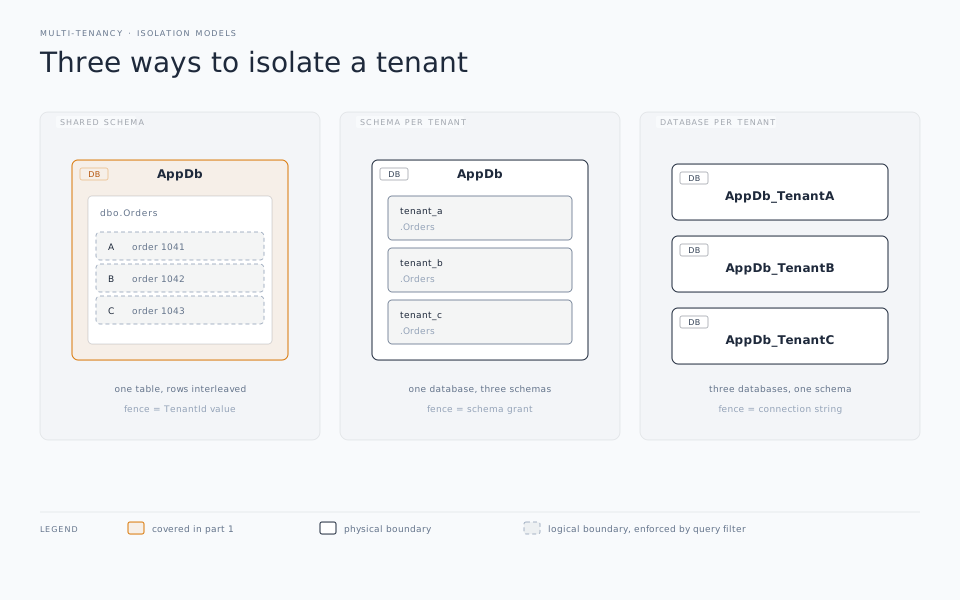
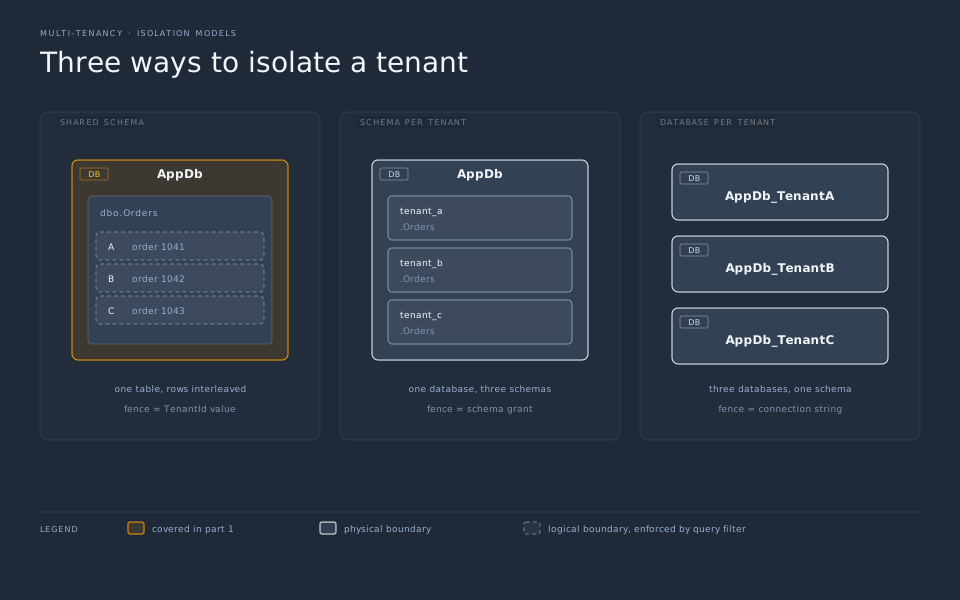
At the end of Part 1 our guild hall was one building with one shared ledger, and we kept everyone’s records apart with a query filter that stapled WHERE GuildId = @guild onto every read. It worked, but the isolation was a promise — one IgnoreQueryFilters() and the promise breaks.
This time we’re going to give each guild a room of its own. Same building (still one database), but every party gets its own set of tables, in its own schema: guild_42.Adventurers, guild_43.Adventurers, and so on. When you’re querying guild_42.Adventurers, there is physically nothing else in there but guild 42’s adventurers. The isolation stops being a WHERE clause you have to remember and becomes the structure of the database itself.
Here’s the fun part, and the reason I split this into its own post: the schema doing the isolating means a bunch of Part 1’s machinery is now dead weight. Let’s start by deleting things.
What you get to delete
The query filter? Gone. No other tenant shares data in the schema to filter out, so HasQueryFilter has nothing to do. Delete it. Boom! Gone!
The SaveChanges stamp goes bye bye. We were stamping every new row with the current GuildId on insert. But they don’t need that anymore; they’re identified by which schema they live in. Delete StampGuild().
The TenantId / GuildId column is optional now. It’s no longer load-bearing for isolation. You can keep it around as an audit convenience if you like, but nothing breaks if you drop it. I usually drop it. That’s one less thing to keep in sync with reality.
The composite key and the partitioning are gone (mostly). In Part 1 we needed the (Id, GuildId) composite key specifically because SQL Server insists the partitioning column live inside the key. No partitioning here means no such requirement, so Adventurer goes back to a plain Id primary key. Partitioning itself is now redundant for tenant separation — each guild already has its own tables. (You could still partition within a single guild’s table by, say, date, if one guild got huge. But that’s a different problem for a different day.)
So the entity slims all the way back down:
public class Adventurer
{
    public int Id { get; set; }
    public string Name { get; set; } = string.Empty;
    public string Class { get; set; } = string.Empty;
    public int Level { get; set; }
}
No interface, no GuildId, no stamp.
The one thing you have to add
If deleting were the whole story this would be a short post. Here’s the catch, and it’s a good one to understand because it bites everybody the first time.
The natural move is to set the schema dynamically in OnModelCreating:
protected override void OnModelCreating(ModelBuilder modelBuilder)
{
    modelBuilder.HasDefaultSchema(_schema);   // e.g. "guild_42"
    modelBuilder.Entity<Adventurer>();
}
Looks right, but it doesn’t work. If you try it, every request quietly hits the same schema — whichever guild happened to make the first request after startup.
The reason for this is that OnModelCreating runs once. EF Core builds your model a single time and then caches it, keyed by the DbContext type. Every subsequent context of that type reuses the cached model, including the HasDefaultSchema value baked into it. Your per-request schema never gets evaluated again.
The fix is to teach EF that the model isn’t the same for every tenant. That’s what IModelCacheKeyFactory is for. It produces the key EF uses to cache and look up models. Add the schema to the key and EF will build and cache one model per schema:
public class SchemaAwareModelCacheKeyFactory : IModelCacheKeyFactory
{
    public object Create(DbContext context, bool designTime)
        => context is GuildDbContext guild
            ? (context.GetType(), guild.Schema, designTime)
            : context.GetType();
}
Expose the schema off the context so the factory can read it, and set it in OnModelCreating:
public class GuildDbContext : DbContext
{
    public string Schema { get; }

    public GuildDbContext(DbContextOptions<GuildDbContext> options, ITenantProvider tenant)
        : base(options)
        => Schema = tenant.Schema;   // "guild_42"

    public DbSet<Adventurer> Adventurers => Set<Adventurer>();

    protected override void OnModelCreating(ModelBuilder modelBuilder)
    {
        modelBuilder.HasDefaultSchema(Schema);
        modelBuilder.Entity<Adventurer>();
        // No query filter. No SaveChanges override. The schema is the boundary.
    }
}
Then register the factory when you configure the context:
builder.Services.AddScoped<ITenantProvider, HttpTenantProvider>();
builder.Services.AddDbContext<GuildDbContext>((sp, options) =>
{
    options.UseSqlServer(builder.Configuration.GetConnectionString("Guild"));
    options.ReplaceService<IModelCacheKeyFactory, SchemaAwareModelCacheKeyFactory>();
});
That ReplaceService line is the entire difference between “works” and “silently serves the wrong tenant.” It’s worth a comment in your codebase so nobody deletes it thinking it’s dead code.
Our ITenantProvider from Part 1 changes only in what it hands back — a schema name instead of an int id. Whether that’s "guild_" + id, or a schema name you stored when the tenant was created, is up to you. You just resolve it from the same place (subdomain, header, claim) you did before.
Creating rooms: the genuinely fiddly part
Runtime querying is now clean. Provisioning and migrations are where schema-per-tenant earns its reputation, and it’s often not a good one. Let’s be straight about that. Maintaining those schemas can be a real pain in the you-know-what.
Standing up a brand-new guild’s schema. The simplest reliable approach is to generate the model’s DDL against a context bound to the new schema and run it. GenerateCreateScript() emits CREATE TABLE statements in whatever schema the model is configured for:
public async Task OnboardGuildAsync(string schema)
{
    var options = new DbContextOptionsBuilder<GuildDbContext>()
        .UseSqlServer(_connectionString)
        .ReplaceService<IModelCacheKeyFactory, SchemaAwareModelCacheKeyFactory>()
        .Options;

    await using var context = new GuildDbContext(options, new FixedTenantProvider(schema));

    await context.Database.ExecuteSqlRawAsync($"CREATE SCHEMA [{schema}];");
    var createTables = context.Database.GenerateCreateScript();
    await context.Database.ExecuteSqlRawAsync(createTables);
}
One shot, and the new guild has a fully formed set of tables in its own schema. Interpolating a schema name into SQL is a touchy prospect and if someone knows you’re doing it, it can be a easy in to SQL injection attacks. You have to validate it hard against an allow-list or a strict pattern before it goes anywhere near ExecuteSqlRaw. A common approach is to maintain a master database table of tenants and their schema names and validate every request against that master list.
Evolving every guild’s schema over time. Scaffolded EF migrations tend to bake the active schema name into their operations, so “just loop Migrate() over every schema” doesn’t cleanly work the way it does when the schema is fixed. Your realistic options are: keep migrations schema-relative and apply them per-schema in a loop, script your own diff-and-apply routine, or don’t hand-roll this.
Here’s a great secret all experienced developers learn. Never hand-roll anything when a quality library or tool exists.
Libraries like Finbuckle.MultiTenant exists precisely to handle the schema/model/migration plumbing, and since it adopted EF 10’s named query filters it plays nicely with the filters from Part 1 too. Hand-rolling schema-per-tenant migrations is a great way to learn exactly why libraries like that exist.
One nice consolation: because each schema gets its own __EFMigrationsHistory table. It lives in the default schema, which is now the tenant’s. Every guild tracks its own migration state independently. Guild 42 can be a version ahead of guild 43 without them stepping on each other. That also solves the problem of adding new tenants and having them easily get their schema created up to that point without having to figure out the diffs.
So where does this leave us?
Compared to Part 1, schema-per-tenant is a real step up in isolation — a bug in your query code can’t leak across tenants, because there’s no shared table for it to leak through. You still get one database to back up, one server to size, one connection pool to share across everybody, which keeps operations sane.
The costs are equally real: a compiled model cached per schema (fine for dozens of tenants, a memory concern for thousands), and a migration story that goes from “run it once” to “run it carefully, per schema, ideally with help.” It’s the classic middle child. It’s more isolated than Part 1 and cheaper to run than what’s coming.
Because the next room upgrade is the big one. In Part 3, we stop sharing the building entirely: every guild gets its own database. That deletes even more code, including the model cache key we just added. But it hands you a whole new set of operational bills to pay. See you there.