
Thursday, July 23, 2026 | 4 minutes
Photo Organizer - A Handy Little App
I’ve got years of digital photos scattered across old backup drives, phone dumps, and random folders with names like New Folder (3). No consistent structure, no easy way to spot duplicates, and no good way to tell what’s actually a photo versus a screenshot versus some random PDF that got mixed in. I’ve been meaning to sort it all out for years. Instead of doing it by hand, I decided to put Claude Code to work and build a purpose-built tool for the job: PhotoOrganizer.
What I asked for
The idea was simple: point it at a messy folder and have it sort everything into a clean, dated structure — photos here, videos there, everything else off to the side — without ever losing or overwriting a file. That last part was non-negotiable. I was about to point this thing at irreplaceable family photos, so “never delete, never overwrite” had to be a hard rule, not just a good intention.
Beyond that, I wanted it to be smart about a few things that trip up naive “sort by date” scripts:
- Pull the date from EXIF/metadata first, not just the file’s last-modified timestamp, which is usually wrong after a file has been copied around for a decade.
- Keep RAW+JPEG pairs and Live Photo HEIC+MOV pairs together instead of splitting them into different month folders because one has better metadata than the other.
- Find likely duplicates without guessing — actually prove two files are byte-identical before flagging them.
- Let me undo a run if something looked wrong.
What it turned into
Claude and I worked through this as a proper .NET 10 console app — Clean Architecture, PhotoOrganizer.Core holding all the logic behind IFileSystem/IMetadataReader abstractions, PhotoOrganizer.Cli as a thin Spectre.Console front end, and a full xUnit test suite behind it. It ended up with two passes:
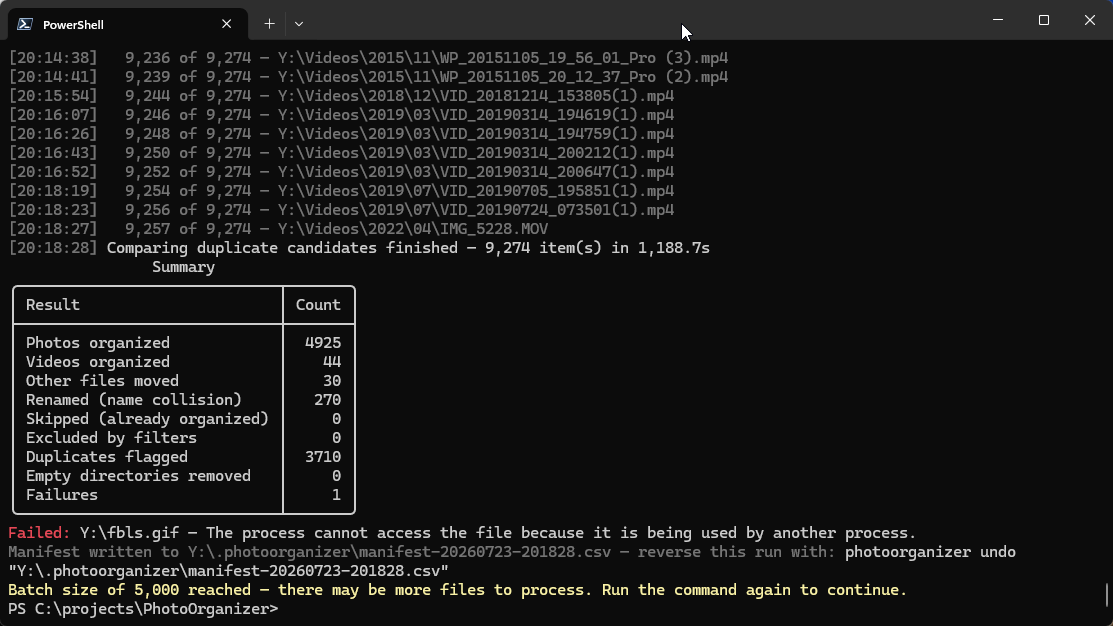
Organize pass. Every file gets classified as a photo, video, or “other,” then dropped into Photos\yyyy\MM\, Videos\yyyy\MM\, or a flat Other\ folder. The date comes from embedded metadata first (EXIF DateTimeOriginal for photos, QuickTime/MP4 creation date for video), falling back to a date parsed out of the filename (it recognizes IMG_20210510_123456.jpg, WhatsApp’s IMG-20200101-WA0001.jpg, and similar patterns), and only as a last resort the file’s own timestamps. Companion files — RAW+JPEG, HEIC+MOV Live Photo pairs, and sidecars like .xmp and .aae — travel together based on whichever member has the most trustworthy date. Name collisions get a -2, -3 suffix; nothing ever overwrites anything.
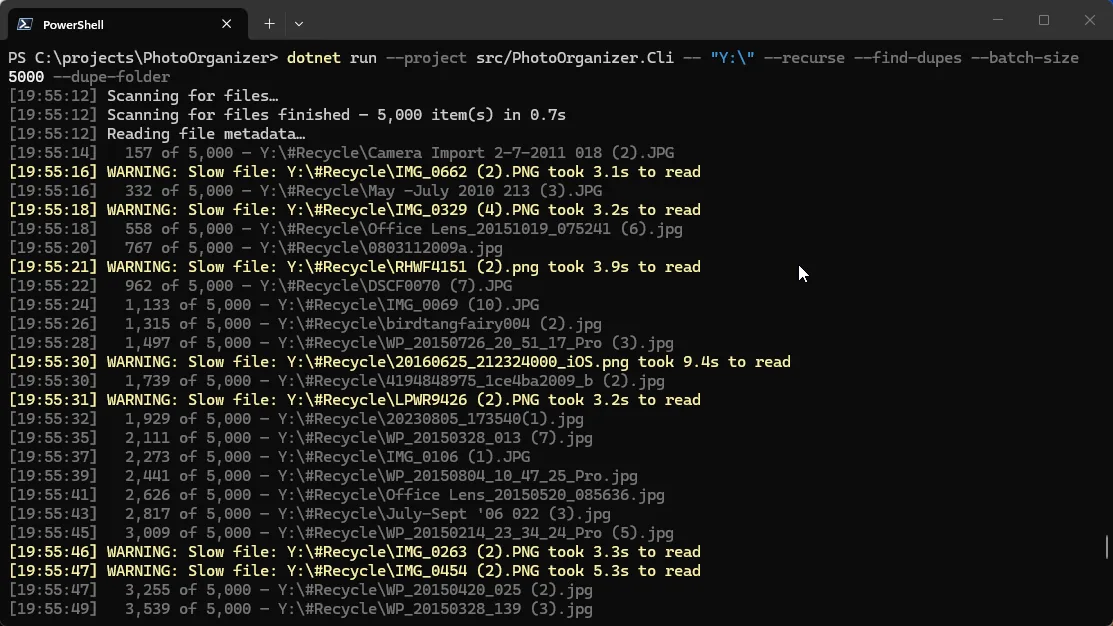
Duplicate pass (--find-dupes). Rather than trusting file names or even file hashes up front, it prefilters by size, then by metadata signature (pixel dimensions, video duration), and only confirms a match once files are proven byte-identical via tiered xxHash128 hashing. Confirmed duplicates get a -dupe suffix or move to a Duplicates\ folder for easy review — again, nothing is ever deleted automatically.
On top of that: every mutating run writes a CSV manifest, so photoorganizer undo <manifest> can put everything back exactly where it came from. --dry-run previews the entire operation, including the duplicate pass, without touching a single file. --batch-size lets me chew through a few hundred thousand files in controlled chunks instead of one multi-hour run. And since junction/symlink directories are never followed during enumeration, there’s no risk of it wandering out of the folder I pointed it at.
Working with Claude on it
This was a good example of where an AI coding agent earns its keep on a personal utility: the individual pieces (classify by extension, read EXIF, hash a file) are all things I could write myself in an afternoon, but stitching them together correctly — the fallback ordering for dates, keeping companion files in sync through a collision rename, making duplicate detection dry-run-aware so the preview actually matches what a real run would do — is the kind of detail work that’s easy to get subtly wrong. Claude handled the security-hardening pass too: making sure enumeration can’t escape the source tree through a junction, that console output is markup-escaped, and that undo refuses to act on a manifest with relative paths.
I ran it against a real backup drive with dry-run first, reviewed the plan, then let it loose for real. A few hundred thousand files later, I’ve got a clean Photos\yyyy\MM\ tree and a Duplicates\ folder full of things I can safely delete by hand. Exactly what I wanted.
The repo is public if you want to see how it’s put together, and the user guide covers every option in more depth than I’ve gone into here.